> ## Documentation Index
> Fetch the complete documentation index at: https://installerguides.lunarenergy.com/llms.txt
> Use this file to discover all available pages before exploring further.
# Communication Wiring
Route shielded wires to the Low Voltage Connections.
Open terminal levers, insert stripped wire (0.4"), and close levers until they click.
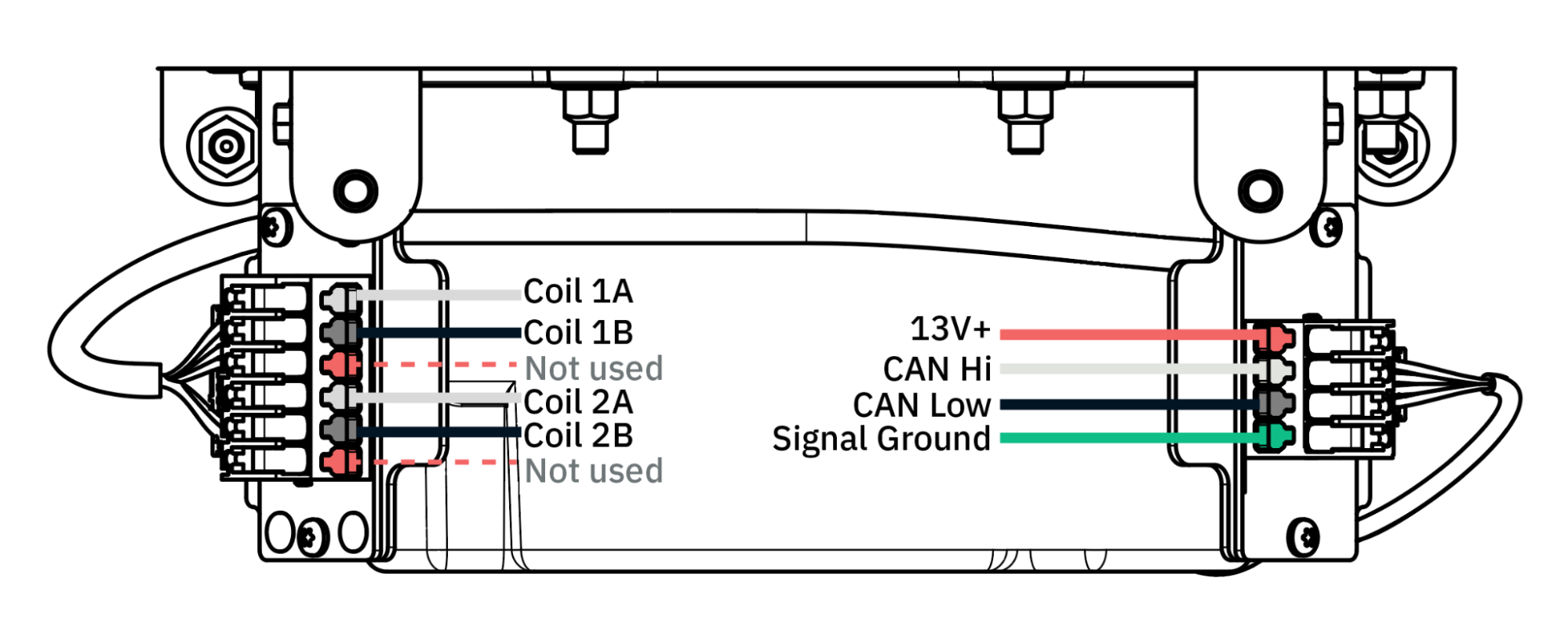 Terminate the CAN communication cable's drain wire (shielding conductor) at **only one end** — either the inverter or the Bridge.
**Rogowski coils (CT)** wiring is required for partial home setup and Power Control System settings. See the [Rogowski coils installation section](/installation/installing-cts) for more details.
Terminate the CAN communication cable's drain wire (shielding conductor) at **only one end** — either the inverter or the Bridge.
**Rogowski coils (CT)** wiring is required for partial home setup and Power Control System settings. See the [Rogowski coils installation section](/installation/installing-cts) for more details.